 |
|
|
|
|
|
|
|
|
|
|
|
|
|
|
|
|
 |
|
|||||||||||||||
 |
 |
|
||||||||||||||
 |
 |
 |
 |
 |
 |
 |
 |
 |
 |
|
||||||
 |
 |
 |
 |
 |
 |
 |
|
|||||||||
 |
 |
|
||||||||||||||
 |
 |
|
||||||||||||||
 |
|
|||||||||||||||
| View unanswered posts | View active topics |
It is currently Sat Aug 15, 2026 5:49 am |
|
All times are UTC - 6 hours [ DST ] |
Forum rules
- n00bfest is not the special olympics. It is a gaming community. Do not act like n00bfest is a retard daycare or you will be punished.
- Outright flames and flamebaiting will be punished.
- Even if you are not an adult, do your best to act like one.
- *NEW* Political/Religious News and NSFW posts do not belong here. Use the Videos, Links, Political/Religious News Discussion Forum
- Punishments range from warnings to permanent forum/gameserver bans.

|
Page 1 of 1 |
[ 10 posts ] |
| Previous topic | Next topic |
SSDs
| Author | Message |
|---|---|
|
[n00b] Member  Joined: Fri Jun 24, 2011 9:38 am Posts: 262 Location: Alabamer 
|
 SSDs SSDsSo, I'm getting my tax return in tomorrow and I've been thinking about ordering an SSD drive. I just wanted to ask if anyone here has had an Intel SSD. I have heard that Intel SSD's are one of the best on the market when it comes to reliability. I will be honest. I am not looking for the fastest SSD on the market. I am looking for a more reliable device that I'm not having problems with 2 months down the road.
I am looking at this one currently http://www.newegg.com/Product/Product.aspx?Item=N82E16820167050. I am really only looking at this one due to the 5yr warranty on it, the price tag is a bit high, but for a warranty like that I'll pay it. It has fairly decent reviews on newegg, and since my computer is a tad older it only supports up to SATA II. What I'm asking is, if anyone knows of a specific brand and model that you think is a better bang for my $, speak up! I would like another 40 or 60 gigs of memory for it, but I'm willing to take a lower amt of memory for reliability. Oh and I had another question. Once I get this in, am I better off just formatting my original HD for a complete fresh start from scratch? Even though I defrag quite a bit, it seems my computer is soo much slower than it used to be. Hence the feeling I should upgrade to an SSD. |
| Thu Mar 01, 2012 7:33 pm |

|
|
|
|
[n00b] Member  Joined: Mon Jun 21, 2010 6:04 pm Posts: 4413 Location: Here.
|
Re: SSDs viewtopic.php?f=11&t=44033
When you get an SSD, format your regular HDD and turn it into storage and use the SSD for OS/Programs and files you use on the reg. My SSD is 90gb and I love it. I can tell the difference quite easily and recommend you get a smaller SSD in the SATA III category rather than a larger one that is SATA II because you should be using HDDs for storage. _________________  |
| Thu Mar 01, 2012 8:50 pm |
|
|
|
|
[n00b] Member Joined: Fri Jun 24, 2011 9:38 am Posts: 262 Location: Alabamer
|
Re: SSDs Yeah I was planning on making my normal HD for storage only, with my OS and games on the SSD.
My Mobo is old and only supports up to SATA II so no need in getting a SATA III. Was mainly wondering if Intel SSD's were the way to go in terms of reliability. I've just read too many horror stories of SSD's going bad after a month, or even right out of the box. |
| Thu Mar 01, 2012 11:24 pm |
|
|
|
|
[n00b] Member Joined: Mon Jun 21, 2010 6:04 pm Posts: 4413 Location: Here.
|
Re: SSDs Makisupa wrote: Yeah I was planning on making my normal HD for storage only, with my OS and games on the SSD. My Mobo is old and only supports up to SATA II so no need in getting a SATA III. Was mainly wondering if Intel SSD's were the way to go in terms of reliability. I've just read too many horror stories of SSD's going bad after a month, or even right out of the box. If you get a SATA III, you'll be future-proof to an extent and they are often cheaper. The reason they are cheaper is because supply goes down on the SATA II devices and so the price goes up. Same thing happens on RAM, HDDs and CPUs. About the only thing that it doesn't seem to happen on are GPUs. Example: http://www.newegg.com/Product/Product.a ... 6820167095 <--brand new, same storage, same price but much better performance regardless of whether or not you use SATA II or SATA III, but it's SATA III and backwards compatible. Or: http://www.newegg.com/Product/Product.a ... 6820148442 <--SATA III and more space, and it has the best 'steady-state' read/write speeds on the market right now (steady-state means after you've used the drive for a while the performance no longer has super-high peaks in speed but settles to a particular average). The older Intels used a Marvell controller which is more reliable than most SandForce controllers but not as fast. The newer one (such as the one I mentioned) uses a SandForce controller with custom firmware with a lot more bugs fixed and therefore better stability than other SandForce-based drives without compromising on the speed they provide. Regardless of which SSD you choose, the newer ones have lower shelf lives period because of the switch from Single Layer Cells, which write one bit of data on each memory cell, to Multi-Layer Cells which write two bits of data per cell and as a result, have a lower number of writes allowed before they crap out. Even so, MLC-based drives (which are way cheaper than SLC-based drives, which are still being made for the enterprise level) have a predicted life span of about 5 to 10 years. The only reason why Intel tends to be more reliable is because they have a better handle on firmware, otherwise they're pretty much exactly the same PCBs as every other drive out there. The Intels don't actually have better performance, and like I mentioned, the Crucial M4 has the best performance over the lifetime of the device. _________________ |
| Fri Mar 02, 2012 12:33 am |
|
|
|
|
[n00b] Member Joined: Fri Jun 24, 2011 9:38 am Posts: 262 Location: Alabamer
|
Re: SSDs Yeah I didn't really think about the future when it comes to this computer. Mainly due to the fact I know I'll have a decent amount of upgrading to do when I get a new one, and will eventually just scrap my current computer out. Yeah when it comes down to it I really just don't want to be worried 6mo to a year down the road if my computer is gonna boot or BSOD that day. With everything I've been reading about intels reliability, I'm inclined to definitely stick with an intel, but will probly go with the cherryville you posted due to the fact of SATA III and popping this in a new comp when I get one.
Can't wait to cream my pants over how fast my comp and games and porn will perform when this is done. lol |
| Fri Mar 02, 2012 1:40 am |
|
|
|
|
[n00b] Member Joined: Mon Jun 21, 2010 6:04 pm Posts: 4413 Location: Here.
|
Re: SSDs Makisupa wrote: Yeah I didn't really think about the future when it comes to this computer. Mainly due to the fact I know I'll have a decent amount of upgrading to do when I get a new one, and will eventually just scrap my current computer out. Yeah when it comes down to it I really just don't want to be worried 6mo to a year down the road if my computer is gonna boot or BSOD that day. With everything I've been reading about intels reliability, I'm inclined to definitely stick with an intel, but will probly go with the cherryville you posted due to the fact of SATA III and popping this in a new comp when I get one. Can't wait to cream my pants over how fast my comp and games and porn will perform when this is done. lol Cherryville actually isn't very fast compared to similarly equipped SSDs in everyday average use, but what it lacks in speed it gains in reliability. Conversely: 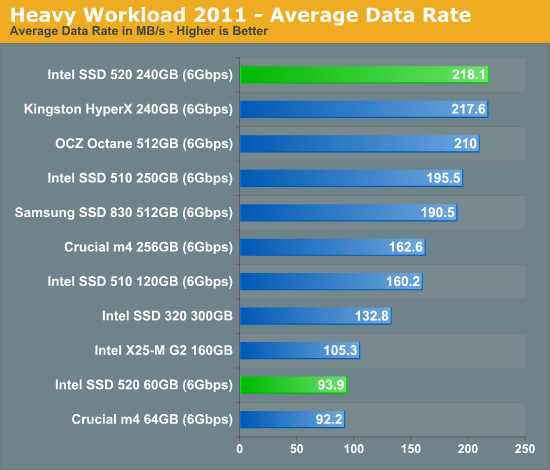 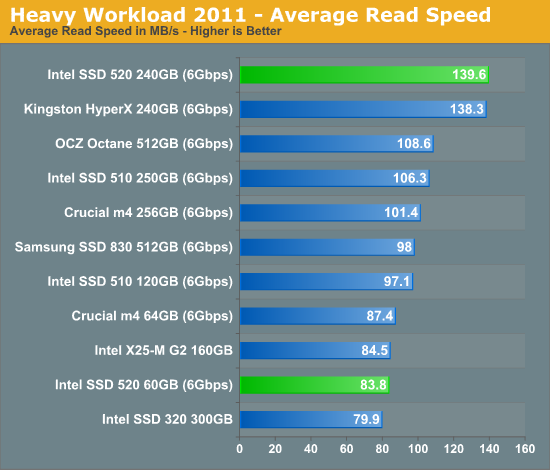 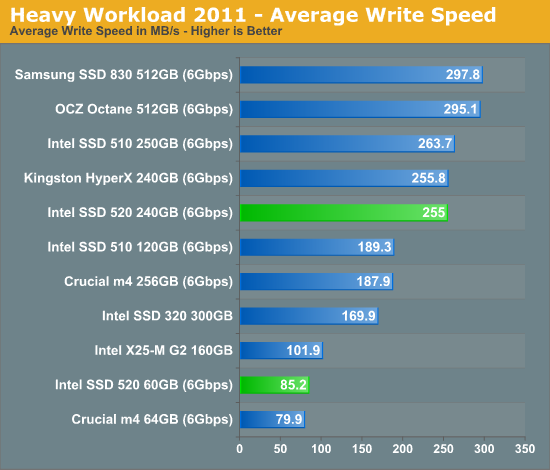 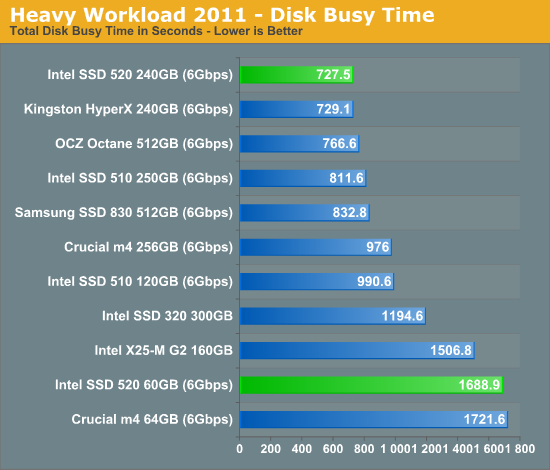 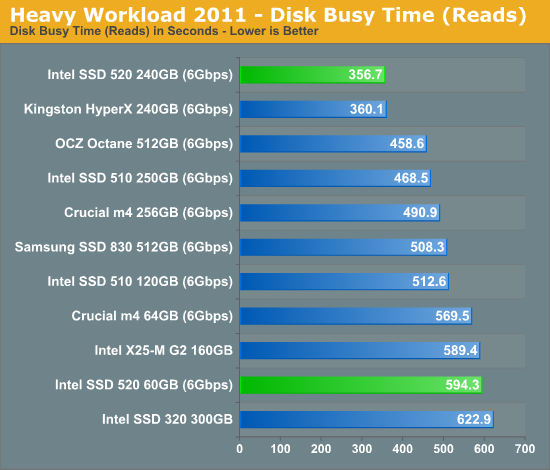 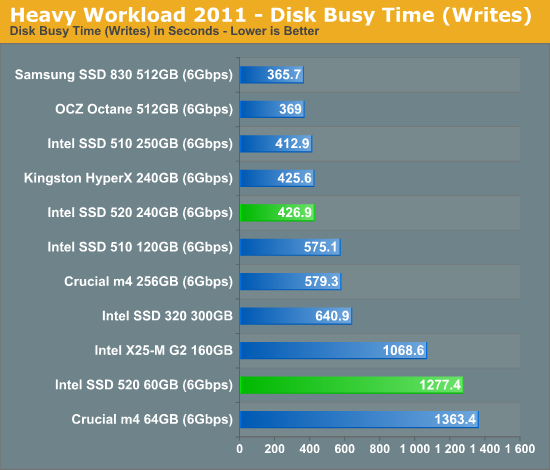 http://www.anandtech.com/show/5508/intel-ssd-520-review-cherryville-brings-reliability-to-sandforce _________________ |
| Fri Mar 02, 2012 5:10 am |
|
|
|
|
Retired n00bfest O.G.
Joined: Fri Dec 31, 2004 12:00 am Posts: 2737
|
Re: SSDs There's really no reason to install your games to an SSD, while they'll benefit from reading and writing/accessing times, large installs and tons of read/writes can cause some of the memory cells to die out a bit quicker. I'd recommend setting up your OS only on an SSD and using a raptor or other fast hard drive with a low seek time to take advantage of your games and programs. Only install the programs you use on a regular basis to the SSD. Things like instant messengers, Ventrilo, etc.
|
| Sun Mar 04, 2012 9:24 pm |
|
|
|
|
Forum Newbie  Joined: Fri Feb 17, 2012 6:39 pm Posts: 30
|
Re: SSDs Don't know much about SSD's but hope this helps: http://www.tomshardware.com/reviews/ssd ... ,3139.html
you may want to wait for the March version. |
| Mon Mar 05, 2012 1:15 am |
|
|
|
|
[n00b] Member Joined: Mon Jun 21, 2010 6:04 pm Posts: 4413 Location: Here.
|
Re: SSDs acid_rain wrote: There's really no reason to install your games to an SSD, while they'll benefit from reading and writing/accessing times, large installs and tons of read/writes can cause some of the memory cells to die out a bit quicker. I'd recommend setting up your OS only on an SSD and using a raptor or other fast hard drive with a low seek time to take advantage of your games and programs. Only install the programs you use on a regular basis to the SSD. Things like instant messengers, Ventrilo, etc. Would you set your Program Files directory to be linked to a separate drive similar to how you can specify the location of My Videos/Pictures/Music/Downloads etc.,? Most games default to the C: drive and oftentimes don't allow any sort of specification as to an alternate location. _________________ |
| Mon Mar 05, 2012 2:13 am |
|
|
|
|
Retired n00bfest O.G.
Joined: Fri Dec 31, 2004 12:00 am Posts: 2737
|
Re: SSDs That is how I do it. I honestly don't know any games that don't allow that, that I can't at least manually move to another drive.
|
| Mon Mar 05, 2012 7:45 am |
|
|
|
|
|
Page 1 of 1 |
[ 10 posts ] |
|
All times are UTC - 6 hours [ DST ] |
Who is online |
Users browsing this forum: No registered users and 7 guests |
| You cannot post new topics in this forum You cannot reply to topics in this forum You cannot edit your posts in this forum You cannot delete your posts in this forum You cannot post attachments in this forum |